To start off, I would like to say this is risky and if you buy bitcoin, you are taking a chance that could make or break you. When I first saw bitcoin, it was in 2010, and I didn’t think much of it. Now, I am continually looking at my phone to see if it went up! My prediction is that it is going to go up to 40,000 by the end of next year in 2019.
How to BUY bitcoin!
You need to use an exchange to exchange your money from USD (United States Dollars) to BTC (Bitcoin). The way to do that is through Coinbase. If you sign up on my link, you can get $10.00 for any purchase over $100.00 of bitcoin. So click on Coinbase you’ll be redirected to the site, and you can start your journey to purchasing bitcoin. Coinbase will ask you to enter some personal information. You’ll be asked to provide some form of payment. The way that I bought bitcoin is through my credit card.
Using Credit Card for verification:
For cards, these verification amounts will be sent as charges. Coinbase will make two test charges to the card between 1.01 and 1.99 in your local currency. These should appear in the ‘recent activity’ section of your card issuer’s website as ‘pending’ or ‘processing’ charges.
Please note:
- Charges for exactly 1.00 are not used for card verification and can be ignored. These are caused by the card processing network, and are separate from the Coinbase verification amounts.
- Neither the verification amounts nor the 1.00 charges will post to your card–they are temporary. They will display as ‘pending’ for up to 10 business days, then disappear.
If you don’t see the verification amounts in your card activity, please try the following:
- Wait 24 hours. Some card issuers may take longer to display the pending amounts.
- If you don’t see the test charges appear after 24 hours, contact your bank or card issuer to ask if they can provide the amounts of any pending Coinbase authorizations.
- If your card issuer is unable to find the charges, or if the amounts have already been removed, return to the payment methods page and select ‘verify’ next to your card. You will see an option to re-charge your card at the bottom.
- Sometimes your card issuer may flag one or all of these verification amounts as fraudulent and block the charges. If that is the case, you will need to contact your card issuer to stop the blocking, and then restart the verification process.
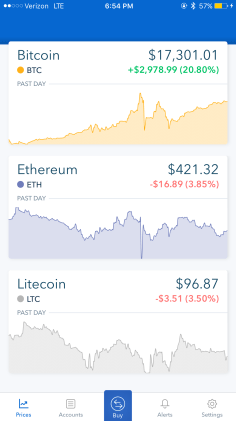
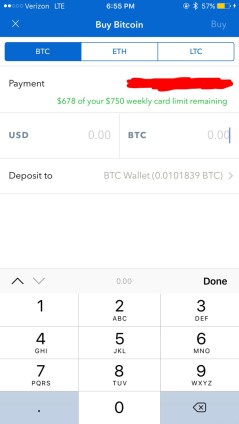
After you finish all of the verification, you can buy Bitcoin, litecoin, or Etherum. The bottom of the app you could click on the buy button in the middle. Then in the USD, you can input how much money you want to exchange for bitcoin. After that, you click on buy on the right top corner of the screen. Lastly, it will ask you to confirm the purchase, and you just bought bitcoin that will be transferred to your wallet.
If you have any questions please feel free to email me!
 AceAlphaTech
You going to make one about how to sell?
LikeLike
I’ll try to make one in a week or two 🙂
LikeLiked by 1 person